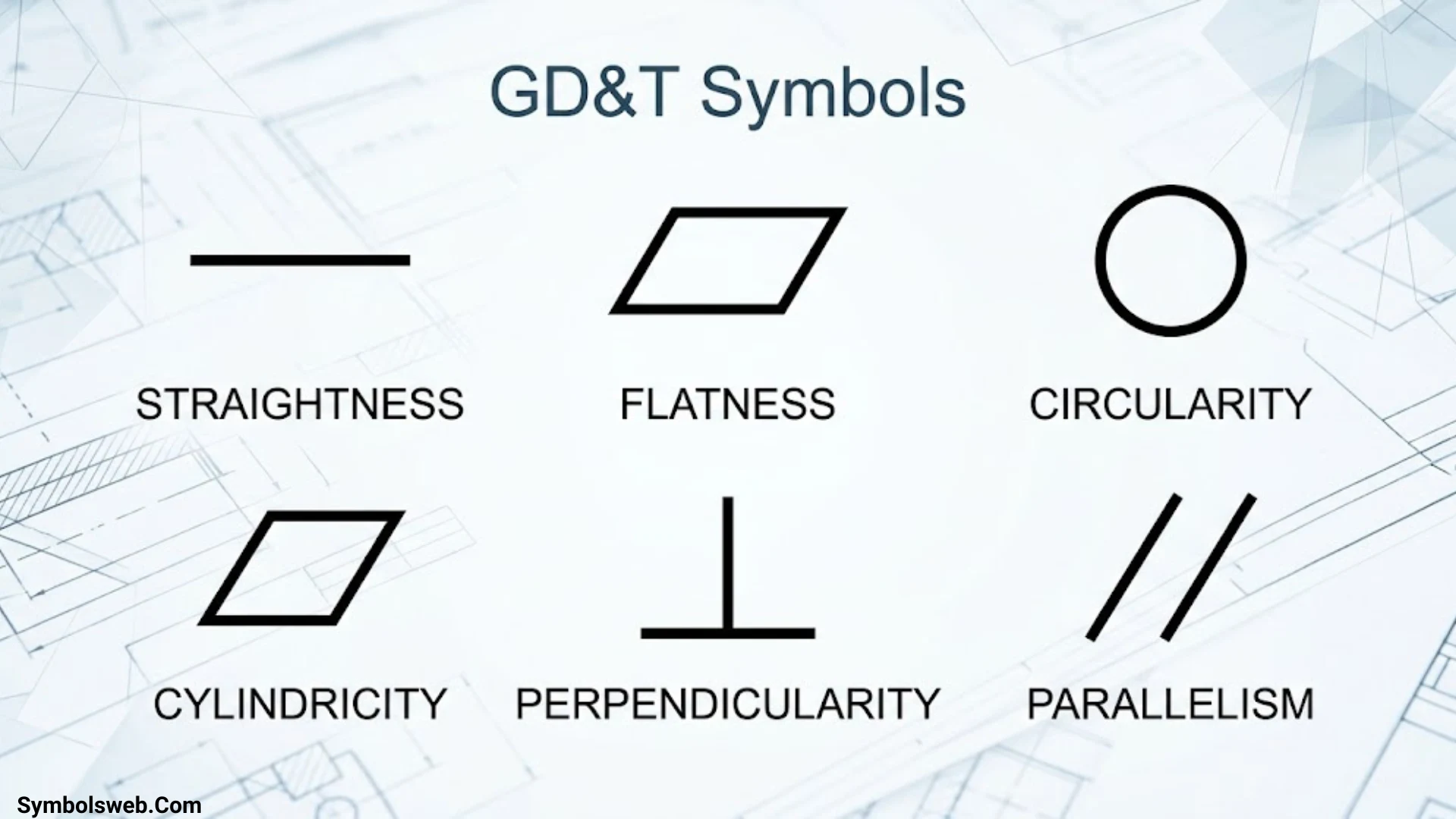
GD&T symbols help engineers define how much a manufactured part can vary from its intended shape, orientation, and location. These symbols appear on engineering drawings to communicate precise requirements for machining, assembly, and quality inspection. When you understand them, you can read technical drawings more confidently and avoid costly manufacturing mistakes.
Geometric Dimensioning and Tolerancing (GD&T) uses a standardized system of symbols, dimensions, tolerance zones, and datum references. Instead of relying only on plus-or-minus dimensions, engineers can specify exactly how a surface, hole, shaft, or other feature must behave. This makes requirements clearer for designers, machinists, inspectors, and suppliers.
This guide covers the GD&T symbols chart, geometric tolerance categories, feature control frames, datum symbols, material condition modifiers, and practical inspection methods. You’ll also learn how to distinguish similar controls, interpret common drawing callouts, and apply the correct concepts to real manufacturing situations.
What Are GD&T Symbols?
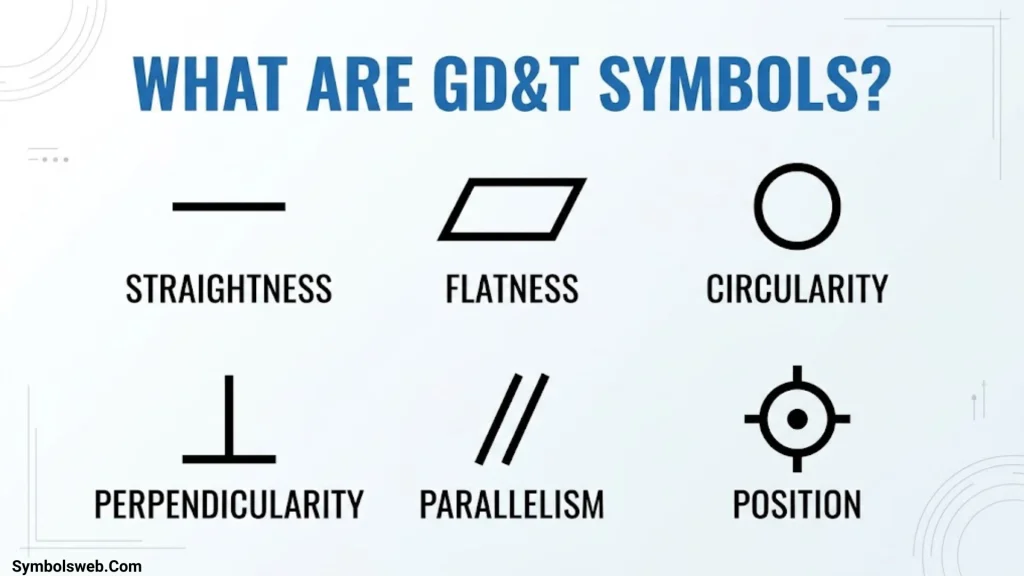
GD&T (Geometric Dimensioning and Tolerancing) is a standardized engineering language used to define allowable variation in the geometry of manufactured parts. It describes requirements for features such as flat surfaces, cylindrical holes, shafts, angled faces, and complex contours.
Engineers use GD&T to communicate design intent. A drawing might specify a hole’s diameter and also control its position relative to two mounting surfaces. The diameter requirement controls size, while the position requirement controls where the hole must be located.
Without geometric controls, two parts could meet their size dimensions but still fail to assemble correctly.
For example, a mounting plate may have four holes with acceptable diameters. However, if one hole sits too far from its intended location, the plate may not align with its mating component.
GD&T helps define these requirements in a consistent, measurable way.
What Does GD&T Stand For?
GD&T stands for Geometric Dimensioning and Tolerancing.
- Geometric dimensioning defines the intended geometry and relationships between features.
- Tolerancing specifies the acceptable limits of variation.
- Geometric characteristic symbols identify the type of geometric control.
- Datums establish references for locating and orienting features.
- Feature control frames communicate geometric tolerance requirements.
The ASME Y14.5 standard establishes rules, definitions, symbols, and recommended practices for interpreting GD&T on engineering drawings. ASME currently lists the 2018 edition of Y14.5 among its dimensioning and tolerancing standards. Always follow the edition specified by the drawing or contract.
GD&T vs. Traditional Dimensional Tolerancing
Traditional dimensional tolerancing controls a size using limits or a plus-or-minus value. GD&T can control size-related features as well as their geometric relationships.
| Requirement | Traditional dimension | GD&T control |
| Hole diameter | Specifies acceptable hole size | Position can control the hole’s location relative to datums |
| Mounting surface | Specifies thickness or distance | Flatness controls surface form |
| Shaft | Specifies shaft diameter | Straightness or runout controls additional geometric requirements |
| Two faces | Specifies their separation | Parallelism or perpendicularity controls their orientation |
| Curved component | Specifies selected dimensions | Profile controls the permitted deviation from an intended contour |
These methods complement each other. GD&T does not eliminate dimensional tolerances; it makes geometric requirements more explicit.
GD&T Symbols Chart With Meanings
The following GD&T symbols chart summarizes the geometric characteristic symbols commonly associated with ASME Y14.5.
A key distinction matters: the traditional teaching set contains 14 geometric characteristic symbols, but ASME Y14.5-2018 removed concentricity and symmetry, leaving 12 current geometric characteristic symbols in that edition. Those two symbols may still appear on older drawings.
| Symbol | GD&T symbol name | Category | Main purpose |
| ⏤ | Straightness | Form | Controls line or applicable axis straightness |
| ⏥ | Flatness | Form | Controls the form of a surface |
| ○ | Circularity (roundness) | Form | Controls each circular cross-section |
| ⌭ | Cylindricity | Form | Controls the entire cylindrical surface |
| ⌒ | Profile of a Line | Profile | Controls a two-dimensional profile |
| ⌓ | Profile of a Surface | Profile | Controls a three-dimensional surface |
| ∥ | Parallelism | Orientation | Controls parallel alignment |
| ⟂ | Perpendicularity | Orientation | Controls a 90-degree relationship |
| ∠ | Angularity | Orientation | Controls a specified angular relationship |
| ⌖ | Position | Location | Controls the location of an applicable feature |
| ↗ | Circular Runout | Runout | Controls variation at individual circular sections during rotation |
| ⌰ | Total Runout | Runout | Controls variation across an entire surface during rotation |
Symbol fonts and CAD software may display some characters differently. Use the symbol definitions and governing drawing standard rather than relying on character appearance alone.
Form Tolerance Symbols
Form tolerance controls the shape of a feature without requiring a datum reference. The four form controls are straightness, flatness, circularity, and cylindricity.
| Symbol | Control | Example |
| ⏤ | Straightness | A guide rail must remain straight |
| ⏥ | Flatness | A mounting face must sit evenly |
| ○ | Circularity | A turned shaft section must remain round |
| ⌭ | Cylindricity | A bearing surface must maintain cylindrical form |
Profile Tolerance Symbols
Profile tolerance controls the permitted variation of a line or surface relative to its intended shape.
| Symbol | Control | Example |
| ⌒ | Profile of a Line | A curved cross-section on a machined part |
| ⌓ | Profile of a Surface | A molded housing or complex three-dimensional contour |
Profile tolerances can control form alone or also constrain orientation and location when the drawing includes appropriate datum references.
Orientation Tolerance Symbols
Orientation tolerance controls how a feature aligns relative to a datum.
| Symbol | Control | Example |
| ∥ | Parallelism | Two faces must remain parallel |
| ⟂ | Perpendicularity | A mounting face must align at 90 degrees to a datum |
| ∠ | Angularity | A machined face must follow a specified angle |
Location and Runout Tolerance Symbols
Position is the current geometric characteristic symbol in the location category under ASME Y14.5-2018. Circular runout and total runout control variation on rotating surfaces relative to a datum axis.
| Symbol | Control | Example |
| ⌖ | Position | Locating bolt holes in a mounting plate |
| ↗ | Circular Runout | Checking a rotating shaft section |
| ⌰ | Total Runout | Checking a complete cylindrical surface |
Concentricity and symmetry belong in a separate legacy reference when readers need to interpret older drawings. They should not be presented as current ASME Y14.5-2018 controls for new designs.
The Five Categories of GD&T Tolerances
The five commonly taught categories are form, profile, orientation, location, and runout. Each category addresses a different kind of geometric variation.
Understanding these groups makes the symbol chart easier to use. Instead of memorizing symbols individually, you can start by identifying what the drawing needs to control.
Form Tolerance
Form tolerance controls the shape of an individual feature. These controls generally do not need a datum because they evaluate the feature’s geometry rather than its relationship to another reference.
The four form controls are:
- Straightness: Limits how much a line element or applicable axis can deviate from a straight line.
- Flatness: Limits surface variation between two parallel planes.
- Circularity: Controls the roundness of each circular cross-section.
- Cylindricity: Controls the form of an entire cylindrical surface.
For example, a machine’s mounting face may need a flatness tolerance to prevent rocking or uneven contact. A precision shaft may need straightness control to limit bending along its length.
Profile Tolerance
Profile tolerance controls the permitted deviation from an intended line or surface.
Profile controls are especially useful for parts with complex contours, such as turbine components, molded housings, automotive body panels, and machined curves.
- Profile of a Line evaluates the specified two-dimensional profile.
- Profile of a Surface evaluates the specified three-dimensional surface.
A profile tolerance can control form alone. When properly referenced to datums, it can also control orientation and location.
For example, an engineer may use surface profile to control the contour and alignment of a curved housing that must mate with another component.
Orientation Tolerance
Orientation tolerance controls the angular relationship between a feature and a datum reference.
The three orientation symbols are parallelism, perpendicularity, and angularity.
- Parallelism keeps a feature parallel to a datum.
- Perpendicularity keeps a feature at 90 degrees to a datum.
- Angularity controls a specified angle relative to a datum.
Consider a bracket that supports a motor. Its mounting face may need to remain perpendicular to a reference surface so the motor sits in the intended position.
Orientation tolerances help prevent alignment problems that ordinary size dimensions may not adequately describe.
Location Tolerance
Location tolerance controls where a feature must sit relative to its intended position and applicable datum references.
Position is particularly important for features of size, such as holes, pins, slots, and shafts.
For example, a mounting plate may contain four bolt holes. Each hole can meet its diameter requirement while still being misplaced. A position tolerance controls the acceptable location of those holes relative to the drawing’s datum reference system.
Position tolerances can also use Maximum Material Condition (MMC) or Least Material Condition (LMC) modifiers when applicable. These modifiers affect how the tolerance applies as feature size changes.
Runout Tolerance
Runout tolerance controls geometric variation when a part rotates around a specified datum axis.
It commonly applies to shafts, bearing seats, spindles, and other rotating components.
The two runout controls work differently:
- Circular runout evaluates individual circular elements during rotation.
- Total runout evaluates variation across the entire indicated surface during rotation.
A rotating shaft may meet its diameter requirement yet produce unwanted vibration because its surface does not run consistently around the reference axis. Runout controls help identify and limit this type of variation.
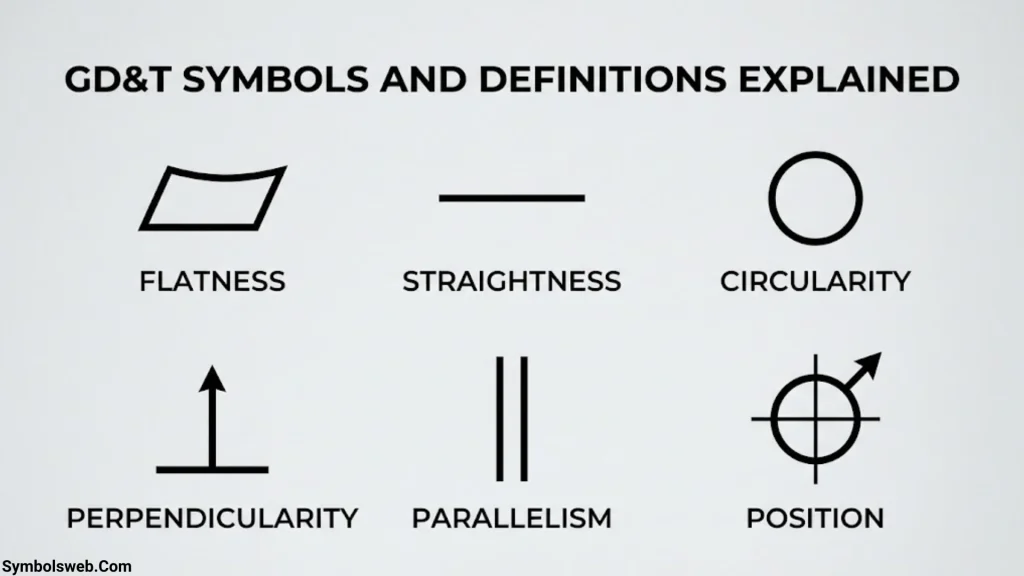
GD&T Symbols and Definitions Explained
This section explains what each current geometric characteristic controls, where it is useful, and how its tolerance zone works.
Straightness Symbol
The straightness symbol (⏤) limits deviation from a perfect straight line. Depending on the application, it can control a line element on a surface or the derived median line or axis of a feature of size.
For a surface, imagine checking a straight line along a machined rail. The actual line must stay within a tolerance zone formed by two parallel lines.
For an axis, the tolerance may define a cylindrical zone within which the derived axis must remain.
These are different applications. Always inspect the feature control frame and the way the requirement attaches to the drawing.
Example: A long guide shaft may require straightness control so it does not bend excessively along its working length.
Flatness Symbol
The flatness symbol (⏥) controls how much a surface can deviate from a perfect plane.
The entire controlled surface must fit between two parallel planes separated by the specified tolerance.
For example, a flatness tolerance of 0.05 mm means the surface must fit within two parallel planes 0.05 mm apart, assuming the drawing uses millimeters.
Flatness does not require a datum reference. It evaluates the surface’s own form.
Common application: Machined mounting faces, sealing surfaces, and precision fixture plates.
Flatness differs from parallelism. A surface may be flat but tilted relative to another surface. Conversely, a surface’s relationship to a datum may meet a parallelism requirement while its own form needs separate evaluation.
Circularity Symbol
The circularity symbol (○) controls the roundness of individual circular cross-sections.
At each applicable cross-section, the actual circular profile must fit between two concentric circles separated by the specified tolerance.
Circularity does not establish the feature’s position relative to a datum axis. It focuses on the shape of each circular section.
Example: A turned shaft may need circularity control to limit local out-of-roundness where a bearing contacts it.
Circularity differs from cylindricity because circularity evaluates sections individually, while cylindricity controls the full cylindrical surface.
Cylindricity Symbol
The cylindricity symbol (⌭) controls the form of an entire cylindrical surface.
The surface must fit between two coaxial cylinders separated by the specified tolerance. This evaluates the cylindrical surface as a whole rather than checking only individual cross-sections.
Cylindricity can capture variations involving roundness, straightness, and taper along the surface. It does not require a datum reference.
Example: A precision bearing seat may need cylindricity control to maintain consistent cylindrical form along its length.
Cylindricity can require more extensive inspection than circularity because the full surface must be evaluated.
Profile of a Line Symbol
The profile of a line symbol (⌒) controls the shape of a specified two-dimensional cross-section.
The actual line must remain within the prescribed profile tolerance zone around the theoretically exact profile.
Engineers use this control for curved edges, cam profiles, molded contours, and other features where simple length or angle dimensions cannot fully describe the required shape.
Example: A cam’s cross section may need a controlled profile so its follower moves as designed.
A line profile requirement applies to the specified line elements. It does not automatically control the entire three dimensional surface.
Profile of a Surface Symbol
The profile of a surface symbol (⌓) controls a three-dimensional surface relative to its intended geometry.
It is useful for complex shapes that include multiple curves, changing angles, or irregular contours. The tolerance zone surrounds the theoretically exact surface.
Depending on the callout, the surface profile can control form alone or include orientation and location relative to datums.
Example: A molded equipment housing may use surface profile to control its outer contour and its relationship to mounting references.
Profile tolerances are versatile, but the drawing must make the intended control and datum relationships clear.
Parallelism Symbol
The parallelism symbol (∥) controls how parallel a feature remains to a datum.
For a surface, the tolerance zone commonly consists of two parallel planes oriented parallel to the datum. For an applicable axis control, the zone may be cylindrical or otherwise defined by the feature control requirements.
Example: A machine slide may need its working surface to remain parallel to a reference surface to maintain consistent movement.
Parallelism is an orientation control. It does not, by itself, establish the complete location of the controlled feature.
Perpendicularity Symbol
The perpendicularity symbol (⟂) controls whether a surface, axis, or applicable plane is oriented at 90 degrees to a datum.
The tolerance zone depends on the controlled feature and the callout.
For example, a bracket’s mounting face may need to remain perpendicular to its base datum. Excessive angular deviation could misalign the attached component.
Perpendicularity differs from a simple 90-degree dimension because GD&T defines an allowable geometric zone relative to a reference.
Angularity Symbol
The angularity symbol (∠) controls orientation at a specified angle relative to a datum. It is commonly used for angles other than 90 degrees.
A basic angle establishes the theoretically exact relationship. The angularity tolerance defines the permissible deviation from that orientation.
Example: A machined support may require a face at 30 degrees to a datum plane.
The angle alone does not define the full geometric requirement. The tolerance zone and datum references establish how much variation the drawing permits.
Position Symbol
The position symbol (⌖) controls the location of an applicable feature relative to its theoretically exact position and datum reference system.
Position is widely used for holes, pins, slots, and patterns of features of size.
For example, a bolt hole may have a specified diameter and a position tolerance relative to datums A, B, and C. The size requirement controls the hole’s diameter, while the position requirement controls its permitted location.
A diametrical position tolerance typically defines a cylindrical zone around the theoretically exact axis location. When the callout includes MMC, an eligible feature may gain bonus tolerance as its actual size departs from maximum material condition.
Position is not simply a measurement of the distance between hole centers. The evaluation must follow the specified datum references, tolerance zone, and applicable modifiers.
Circular Runout Symbol
The circular runout symbol (↗) controls variation at individual circular elements as the part rotates around a datum axis.
An inspector can mount the part using the required datum setup and measure the indicated surface with a dial indicator or suitable instrument.
Circular runout can apply to radial surfaces or, in appropriate configurations, axial faces. The precise control depends on the surface and drawing requirements.
Example: A rotating shaft’s bearing surface may need circular runout control to limit wobble relative to its datum axis.
Total Runout Symbol
The total runout symbol (⌰) controls variation across the entire indicated surface as the part rotates around its datum axis.
Unlike circular runout, which evaluates individual circular elements, total runout evaluates the full surface during the inspection process.
It can help control a combination of surface variations such as taper, straightness, and roundness, depending on the feature and setup.
Example: A precision spindle may require total runout control across a cylindrical bearing surface to support consistent rotation.
Total runout often requires more extensive inspection because the inspector must assess the full surface rather than isolated cross-sections.
What About Concentricity and Symmetry?
Concentricity and symmetry are legacy GD&T symbols under ASME Y14.5-2018. The standard removed both because other controls offer more direct and practical ways to specify the relevant requirements.
- Concentricity: Older drawings used this control for relationships involving derived median points and a datum axis. Position or runout may be suitable alternatives, depending on the actual functional requirement.
- Symmetry: Older drawings used this control for relationships involving median points and a datum center plane. Position or another suitable control may replace it, depending on design intent.
Do not replace either symbol automatically without reviewing the functional requirement. A replacement control must specify the intended geometry and relationship correctly.
How to Read GD&T Symbols on Engineering Drawings
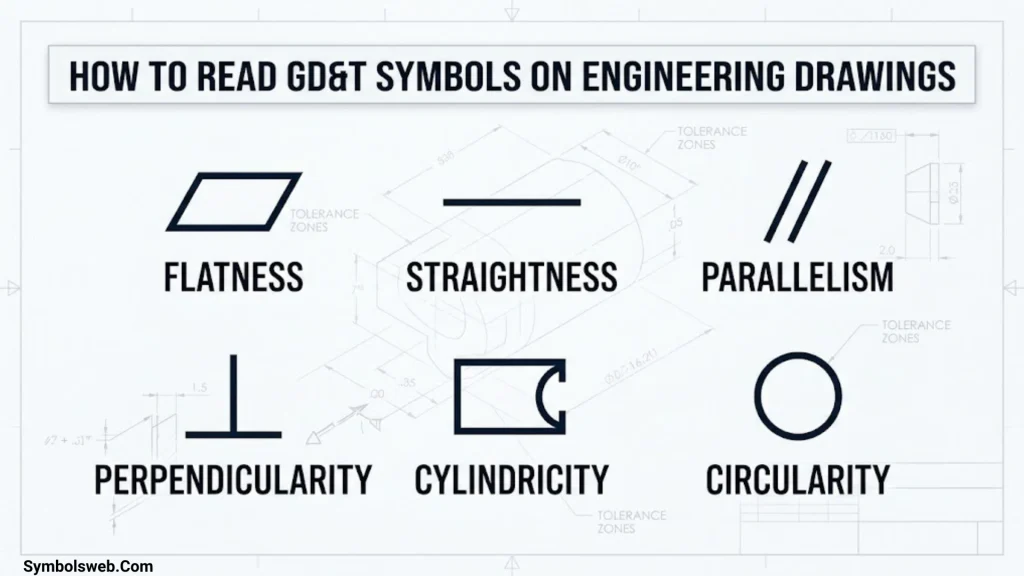
Reading GD&T symbols on engineering drawings requires more than recognizing a symbol. You must understand the feature being controlled, the tolerance value, the datum references, and any applicable modifiers.
Follow these steps when interpreting a drawing.
Identify the Controlled Feature
First, locate the surface, hole, shaft, slot, or other feature associated with the geometric callout.
Look at the leader, extension line, or feature control frame attachment. A symbol may apply to a specific surface or to an axis derived from a feature of size.
This distinction matters because a straightness requirement on a surface line differs from a straightness requirement on a feature’s axis.
Identify the Geometric Characteristic
Next, read the geometric characteristic symbol in the first compartment of the feature control frame.
The symbol tells you what kind of variation the engineer wants to control.
For example:
- ⏥ indicates flatness.
- ∥ indicates parallelism.
- ⟂ indicates perpendicularity.
- ⌖ indicates position.
- ⌓ indicates profile of a surface.
Once you identify the control, determine which geometric feature it applies to.
Read the Tolerance Value
The tolerance value specifies the permitted variation under the stated control.
Consider this illustrative callout:
⏥ | 0.05
If the drawing uses millimeters, this specifies a flatness tolerance of 0.05 mm for the indicated surface.
Now compare it with:
⌖ | ⌀0.20 | A | B | C
This illustrative callout specifies a position tolerance with a diametrical zone of 0.20 mm and datum references A, B, and C.
The diameter symbol indicates the tolerance-zone shape. It does not mean the hole itself must have a diameter of 0.20 mm.
Interpret the Datum References
Datum references establish how the controlled feature relates to the part’s reference system.
In the position example, A is the primary datum, B is the secondary datum, and C is the tertiary datum. The order matters because each datum helps establish the part’s orientation and location for the specified control.
However, not every geometric control requires a datum. Form controls such as flatness and circularity evaluate a feature’s form without a datum reference.
Check Material Condition Modifiers
Finally, check whether the callout includes MMC, LMC, or another applicable modifier.
These modifiers can affect the tolerance calculation or how the feature is evaluated. Never assume that a tolerance uses MMC simply because the drawing controls a hole or shaft.
The complete callout, associated dimensions, drawing notes, and governing standard determine the requirement.
What Is a GD&T Feature Control Frame?
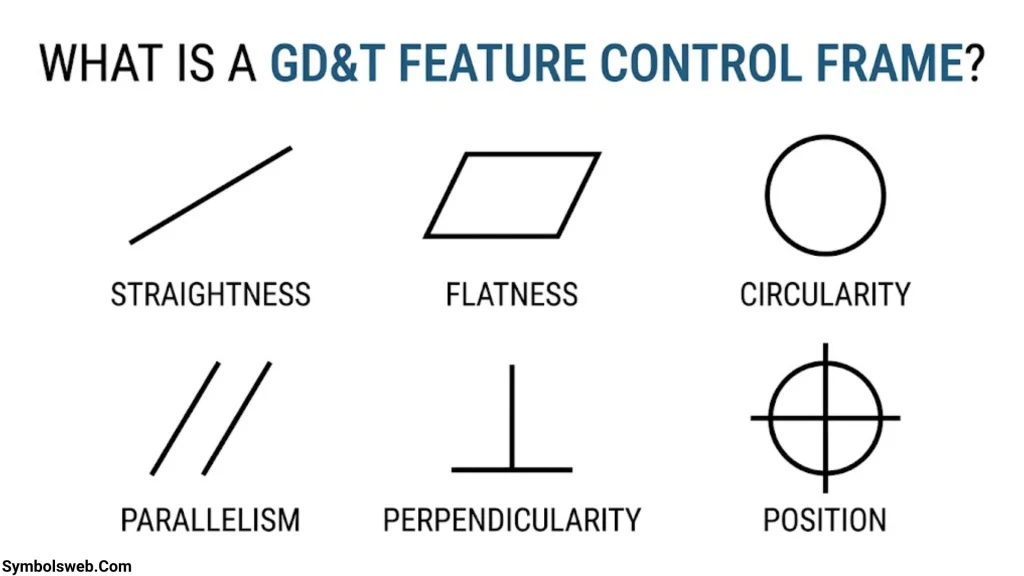
A feature control frame (FCF) is a rectangular, compartmentalized annotation that communicates a geometric tolerance requirement.
It tells the manufacturer or inspector what geometric characteristic to control, how much variation is permitted, and which datum references apply.
Parts of a Feature Control Frame
| Component | Purpose |
| Geometric characteristic symbol | Identifies the required geometric control |
| Tolerance value | Specifies the permitted geometric variation |
| Diameter symbol (⌀) | Indicates a diametrical tolerance zone when used in the callout |
| Material condition modifier | Specifies an applicable material-boundary condition |
| Datum reference letters | Identify the datum features used to establish the reference system |
Not every feature control frame contains every component. For example, a flatness callout usually has no datum reference, while a position callout commonly includes datum references.
How to Read a Feature Control Frame Example
Consider this illustrative position callout:
⌖ | ⌀0.20 | A | B | C
Read it from left to right:
- Position symbol: The control applies to the location of an applicable feature.
- Diameter symbol and tolerance: The tolerance zone is cylindrical with a diameter of 0.20 mm, assuming millimeter units.
- Datum A: Establishes the primary reference.
- Datum B: Establishes the secondary reference.
- Datum C: Establishes the tertiary reference.
The controlled feature must meet the position requirement relative to the specified datum reference system.
A real drawing may include additional modifiers, basic dimensions, or other instructions. Those details can change how the requirement is interpreted.
Common Feature Control Frame Mistakes
Avoid these common errors:
- Treating the diameter symbol as the hole’s required size.
- Ignoring the datum sequence.
- Assuming every tolerance zone is cylindrical.
- Confusing a surface control with an axis control.
- Overlooking material condition modifiers.
- Reading the frame without checking its associated dimensions and drawing notes.
GD&T Datum Symbols and Datum Reference Systems
Datum symbols identify physical features used to establish theoretically exact references for measurement and geometric control.
A datum system helps engineers define how a part should be positioned when checking its geometry. Without a consistent reference, two inspectors could measure the same component using different setups and reach conflicting conclusions.
What Is a Datum in GD&T?
A datum is a theoretically exact point, axis, plane, or other geometric reference established from a real datum feature.
For example, a machined base surface may serve as a datum feature. The corresponding datum plane provides a reference for locating or orienting other features.
The distinction is important:
- Datum feature: The actual physical surface or feature on the part.
- Datum: The theoretically exact reference established from that feature.
- Datum feature symbol: The drawing annotation identifying the feature.
- Datum reference system: The ordered set of datums used to constrain the part for a specified requirement.
Primary, Secondary, and Tertiary Datums
A datum reference system often uses three ordered datum references.
- Primary datum: Establishes the principal reference and constrains the part’s movement.
- Secondary datum: Adds constraints relative to the primary datum.
- Tertiary datum: Adds further constraints to complete the required reference system.
Imagine a rectangular mounting block. Its bottom surface could establish the primary reference, one side could establish the secondary reference, and an adjacent side could establish the tertiary reference.
The actual datum scheme depends on the design and drawing requirements. A part does not automatically use the same datum arrangement for every tolerance.
Datum Plane, Datum Axis, and Datum Center Plane
Different datum references suit different feature types.
| Reference | Typical application |
| Datum plane | Flat mounting surface |
| Datum axis | Cylindrical shaft or hole |
| Datum center plane | Suitable opposed surfaces or a feature of size |
| Datum point | Applicable point-based reference requirements |
For example, a rotating shaft may use a datum axis as the reference for runout. A mounting bracket may use a datum plane for perpendicularity.
Why Are Datums Used in GD&T?
Datums connect a geometric requirement to the part’s function.
They help:
- Establish consistent inspection setups.
- Control feature relationships.
- Support assembly alignment.
- Reduce ambiguity in engineering specifications.
- Improve repeatability in dimensional inspection.
A datum is not simply a convenient edge chosen by the inspector. It must follow the drawing’s specified reference scheme.
GD&T Modifiers and Additional Drawing Symbols
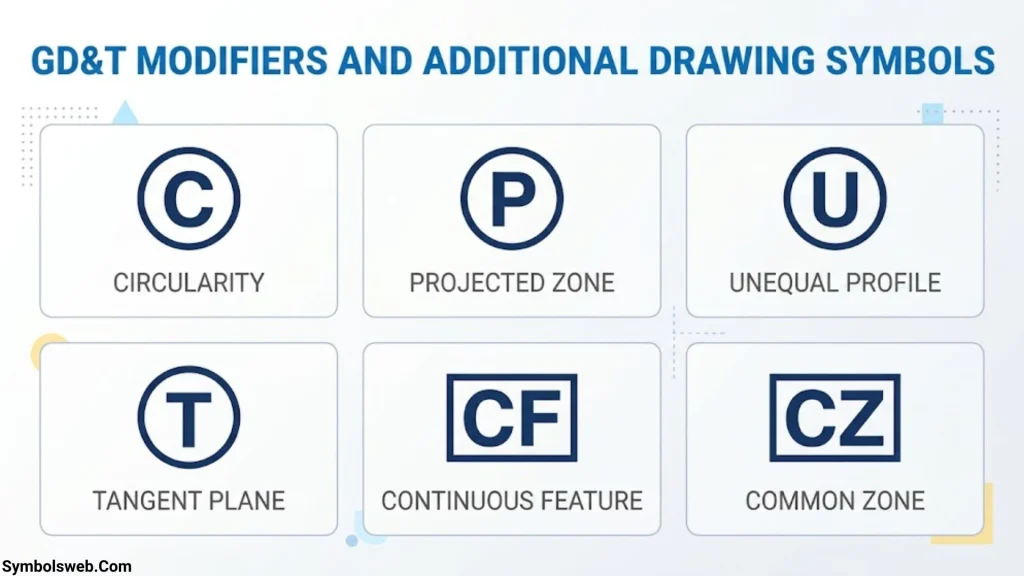
Geometric characteristic symbols identify the control. Modifiers provide additional rules about how particular tolerances apply.
Understanding the difference prevents errors when interpreting GD&T tolerance symbols and feature control frames.
Maximum Material Condition (MMC)
Maximum Material Condition (MMC) describes the size condition in which a feature contains the greatest amount of material within its permitted size limits.
For an internal feature such as a hole, MMC occurs at the smallest permitted hole diameter. For an external feature such as a shaft, MMC occurs at the largest permitted shaft diameter.
Consider a hole with these illustrative size limits:
- Minimum diameter: 10.0 mm
- Maximum diameter: 10.2 mm
The hole is at MMC when its diameter is 10.0 mm.
When a suitable position tolerance includes the MMC modifier, the feature may receive bonus tolerance as its actual size departs from MMC.
For example, if the position tolerance is 0.10 mm at MMC and the actual hole measures 10.1 mm, the size departure is 0.10 mm. Under the applicable MMC rules, that departure can provide an additional 0.10 mm of position tolerance.
The total allowable position tolerance would then be 0.20 mm, assuming the stated size limits and callout are valid and no other requirements change the calculation.
Bonus tolerance can support functional assembly requirements while allowing practical manufacturing variation.
Least Material Condition (LMC)
Least Material Condition (LMC) describes the size condition in which a feature contains the least material within its permitted limits.
For a hole, LMC is the largest permitted diameter. For a shaft, LMC is the smallest permitted diameter.
LMC can be useful when a design needs to protect minimum wall thickness, maintain edge distance, or control a feature’s location under a specific material condition.
Its application must follow the feature type, drawing callout, and governing standard.
Regardless of Feature Size (RFS)
Regardless of Feature Size (RFS) means the applicable geometric tolerance remains independent of the actual size of the feature.
Under ASME Y14.5-2009 and Y14.5-2018, RFS is the default for applicable feature-of-size geometric tolerances unless a permitted material condition modifier specifies otherwise. The explicit RFS symbol is not generally needed to state that default.
This means the geometric tolerance does not gain bonus tolerance merely because the feature size changes.
Diameter Symbol (⌀)
The diameter symbol (⌀) appears in dimensions and feature control frames, but its meaning depends on context.
- Before a size value, it indicates a diameter dimension.
- Before a tolerance value in a feature control frame, it can indicate a diametrical tolerance zone.
For example, ⌀10.0 describes a diameter dimension, while ⌖ | ⌀0.20 | A uses a diametrical position tolerance zone.
The diameter symbol is not itself a geometric characteristic symbol.
Projected Tolerance Zone
A projected tolerance zone extends a specified tolerance zone beyond a feature’s surface for an indicated distance.
This can be useful for threaded holes or locating pins that must align with a mating part beyond the surface where they originate.
The drawing must clearly specify the projected zone and its requirements. Do not assume every hole or pin uses a projected tolerance zone.
Tangent Plane and Profile Modifiers
Other modifiers can refine how a geometric tolerance applies.
For example, a tangent-plane requirement can control the plane contacting the high points of a surface rather than requiring the entire surface to satisfy an ordinary flatness condition.
Profile controls can also include additional modifiers where the applicable standard permits them. Their interpretation depends on the exact callout and governing edition.
For this reason, a GD&T chart should identify modifiers separately from the geometric characteristic symbols.
GD&T Tolerance Zone Shapes Explained
A tolerance zone defines the space within which the controlled geometry must remain. Its shape depends on the geometric characteristic and the way the feature control frame specifies the requirement.
Understanding tolerance zones is often more useful than memorizing symbols alone.
Two Parallel Lines
Two parallel lines can define the tolerance zone for a straightness control applied to a surface line element.
The actual line must remain between those boundaries. The specified tolerance determines the maximum separation between them.
This type of zone applies to a two-dimensional line element, not automatically to the entire surface or a feature’s axis.
Two Parallel Planes
Two parallel planes commonly define zones for flatness and applicable surface-orientation controls.
For flatness, the controlled surface must fit entirely between the planes. For an orientation control, the planes are oriented relative to the specified datum.
For example, a flatness tolerance of 0.05 mm requires the surface to fit between two parallel planes separated by 0.05 mm.
Cylindrical Tolerance Zone
A cylindrical zone is common in position tolerances applied to holes and other applicable features of size.
The zone surrounds the theoretically exact location of the feature’s axis. The specified diameter defines the zone’s size.
A position tolerance of ⌀0.20 mm creates a cylindrical zone with a diameter of 0.20 mm when the callout uses that zone definition.
The feature must satisfy the applicable location requirement relative to its datum reference system.
Circular and Three-Dimensional Surface Zones
Circularity uses a two-dimensional zone formed by two concentric circles around each applicable cross-section.
Cylindricity uses a three-dimensional zone formed by two coaxial cylinders around the entire controlled cylindrical surface.
Surface profile uses a three-dimensional zone around an intended surface. Line profile uses a two-dimensional zone around the specified profile.
The zone shape determines how the actual geometry is evaluated. Two controls with the same numerical tolerance may impose different requirements because they control different geometric characteristics.
Common Differences Between GD&T Symbols
Several GD&T symbols and meanings sound similar, but they address different engineering requirements.
| Comparison | Key difference | Practical example |
| Straightness vs. flatness | Straightness controls a line element or applicable axis; flatness controls an entire surface | Rail alignment vs. mounting-face form |
| Circularity vs. cylindricity | Circularity evaluates individual cross-sections; cylindricity evaluates the complete cylindrical surface | Roundness at a section vs. full shaft form |
| Parallelism vs. perpendicularity | Parallelism controls parallel alignment; perpendicularity controls a 90-degree relationship | Two parallel faces vs. a square mounting face |
| Line profile vs. surface profile | Line profile controls a two-dimensional profile; surface profile controls a three-dimensional surface | Cross-sectional curve vs. complete housing contour |
| Circular runout vs. total runout | Circular runout checks individual circular elements; total runout evaluates the entire surface during rotation | Shaft cross-section vs. full shaft surface |
| Position vs. orientation | Position controls location; orientation controls angular alignment | Bolt-hole location vs. face alignment |
| Dimensional vs. geometric tolerance | Dimensional tolerance controls size; geometric tolerance controls specified geometry | Hole diameter vs. hole position |
| Datum feature vs. datum | The datum feature is physical; the datum is the theoretically exact reference established from it | Machined base vs. reference plane |
A useful rule is to ask what the design needs to control: shape, orientation, location, profile, or rotational variation. That question often narrows the choice quickly.
How to Measure and Inspect GD&T Tolerances
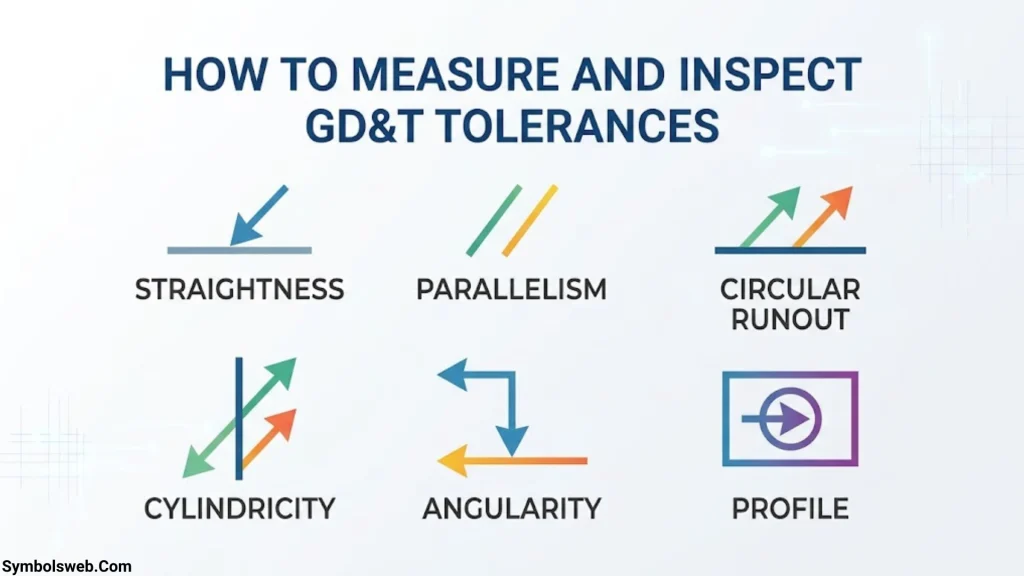
GD&T inspection methods compare the manufactured part with the geometric requirements on its engineering drawing. The right method depends on the feature, the tolerance size, the required uncertainty, and the governing standard.
A measurement tool does not automatically verify every GD&T requirement simply because it produces accurate dimensions.
Coordinate Measuring Machine (CMM)
A Coordinate Measuring Machine (CMM) collects coordinate data from a part using a probe or suitable measurement system.
Inspection software uses those measurements to evaluate specified features and geometric controls.
CMMs commonly support inspection of:
- Hole and pin positions.
- Datum relationships.
- Surface profiles.
- Applicable orientation tolerances.
- Selected form characteristics.
A CMM can measure a hole pattern and evaluate each hole’s position relative to a specified datum reference system. However, the result depends on the inspection strategy, probe access, measurement density, alignment, and evaluation settings.
For complex parts, the inspection program must collect enough useful data to evaluate the intended requirement reliably.
Dial Indicators and Runout Inspection
Dial indicators can help inspect circular runout and total runout on suitable rotating components.
A typical setup involves locating the part using the required datum reference, rotating it, and recording the indicator’s variation.
The inspector must follow the specified control and evaluate the appropriate surface. Circular runout and total runout are not interchangeable, so the inspection procedure must match the callout.
Surface Plates, Height Gauges, and Precision Instruments
Surface plates, height gauges, precision indicators, and other instruments support many routine dimensional and geometric checks.
Their usefulness depends on the control being evaluated.
For example, a height gauge may help inspect certain feature locations, while a surface plate provides a stable reference for suitable setups. Neither instrument automatically replaces a full geometric evaluation when the drawing requires one.
Inspectors should also consider calibration, setup errors, instrument resolution, and measurement uncertainty.
Optical and Non-Contact Measurement
Optical systems and non-contact measurement equipment can help inspect complex surfaces or features that are difficult to reach with a probe.
Available methods include:
- Structured-light scanning.
- Laser triangulation.
- Optical measurement systems.
- Spectral confocal measurement.
- Interferometry for suitable precision applications.
These technologies have different strengths and limitations. Structured-light scanning can capture large amounts of surface data, while some optical methods work better for small features or particular surface types.
A dense point cloud does not automatically prove that a part meets its GD&T requirements. The measurement system and evaluation method must suit the tolerance.
Least Squares and Minimum Zone Methods
Least squares and minimum zones are different geometric evaluation approaches.
Least-squares fitting determines a geometry that minimizes the sum of squared deviations from measured points. Minimum-zone evaluation seeks the smallest permissible zone that contains the relevant measured geometry, as defined for the applicable control.
These methods do not always produce the same result.
For example, a best-fit plane may be useful for analyzing measured surface data, but it does not automatically establish compliance with every flatness or orientation requirement.
Always use the evaluation rules required by the applicable standard and inspection specification.
GD&T Inspection and Tolerance Verification
A reliable inspection process should:
- Identify the exact geometric control and controlled feature.
- Establish the specified datum reference system.
- Select a suitable measurement method.
- Collect sufficient measurement data.
- Apply the correct geometric evaluation method.
- Compare the result with the permitted tolerance.
- Document the result and relevant measurement uncertainty.
This process supports quality assurance, repeatable inspection, and manufacturing process control.
GD&T Symbols Examples in Manufacturing
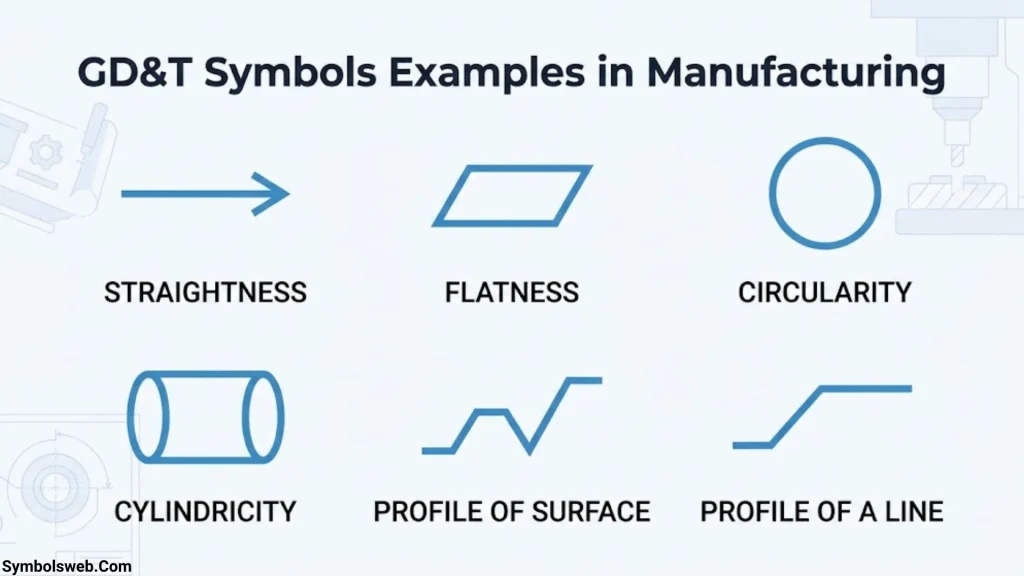
Practical examples help connect drawing symbols with actual engineering problems.
Hole and Bolt Pattern Position
A mounting plate may contain several holes used to attach a motor or gearbox.
Each hole needs an acceptable diameter, but the hole pattern must also align with the mating component. A position tolerance controls the permissible location of the holes relative to the specified datums.
If the holes are misplaced, the fasteners may not fit even when every hole meets its size requirement.
Position tolerances can therefore support assembly alignment and component interchangeability.
Flatness of a Mounting Surface
A machined base may need a flat surface so it contacts another component evenly.
Flatness controls the surface’s form. It does not establish the surface’s orientation relative to a separate datum.
If the design also requires that surface to remain parallel to another reference, a suitable orientation control may be necessary.
This example shows why one geometric control cannot always replace another.
Straightness of a Shaft
A shaft may need straightness control along its length to limit bending or deviation from an ideal line.
The appropriate callout depends on whether the design controls the shaft’s surface line elements or its derived axis.
For a rotating shaft, the engineer may also need runout control. Straightness and runout address different aspects of the geometry.
Perpendicularity of a Machined Face
A bracket may need a face oriented at 90 degrees to a datum surface or axis.
Perpendicularity controls this angular relationship within the specified tolerance zone.
The requirement can help the bracket align correctly with an attached component. It does not automatically control every aspect of the face’s form or location.
Runout of a Rotating Component
A spindle or shaft may need runout control to limit variation relative to its datum axis.
Circular runout evaluates individual circular elements during rotation. Total runout evaluates the full indicated surface.
The appropriate control depends on the functional need, the surface, and the intended inspection.
Profile Tolerance for a Complex Surface
A molded cover may have a curved contour that must match a mating component.
Surface profile can control the permitted variation across the three-dimensional surface. Datum references can establish its required relationship to mounting features.
This can be more effective than trying to describe every curve with separate linear dimensions.
How GD&T Symbols Improve Manufacturing Accuracy
GD&T symbols help manufacturers turn design requirements into measurable acceptance criteria. They improve communication between engineering, production, suppliers, and inspection teams.
Their benefits extend beyond drawing readability.
- Clearer design intent: Geometric controls specify which variations matter to the part’s function.
- Better assembly fit: Position and orientation controls help mating components align correctly.
- Consistent inspection: Datum references and tolerance zones establish a common evaluation framework.
- Reduced ambiguity: Standardized symbols communicate requirements more clearly than lengthy written notes alone.
- Improved quality control: Inspectors can compare measured geometry with defined acceptance criteria.
- More practical manufacturing: Functional tolerances can help avoid unnecessarily restrictive requirements.
However, tighter tolerances are not automatically better. A tolerance should reflect the component’s function, manufacturing process, inspection capability, and cost.
For example, a decorative cover may not need the same geometric precision as a bearing seat. Applying unnecessarily tight tolerances to every feature can increase machining time, inspection costs, and scrap without improving performance.
Common GD&T Symbol Interpretation Mistakes
Even experienced professionals can misinterpret geometric requirements when they overlook part of a callout.
Watch for these common mistakes.
- Confusing size and geometry: A hole can meet its diameter limits but fail its position requirement.
- Mixing up straightness and flatness: Straightness controls a line element or applicable axis, while flatness controls a surface.
- Treating circularity and cylindricity as identical: Circularity evaluates individual cross-sections, while cylindricity controls the entire cylindrical surface.
- Ignoring datum order: Primary, secondary, and tertiary references establish the specified datum reference system.
- Misreading the diameter symbol: A diameter in a feature control frame may define the tolerance-zone shape rather than the feature’s size.
- Assuming all controls require datums: Form controls generally do not require datum references.
- Applying MMC without checking the callout: Bonus tolerance depends on the applicable modifier and feature requirements.
- Using legacy symbols without checking the standard: Concentricity and symmetry were removed from ASME Y14.5-2018.
- Choosing an unsuitable inspection method: A measurement system must be appropriate for the control, tolerance, and uncertainty requirements.
When a callout seems unclear, check the full drawing, its notes, the applicable standard, and the intended function before making assumptions.
GD&T Standards and Engineering Drawing Requirements
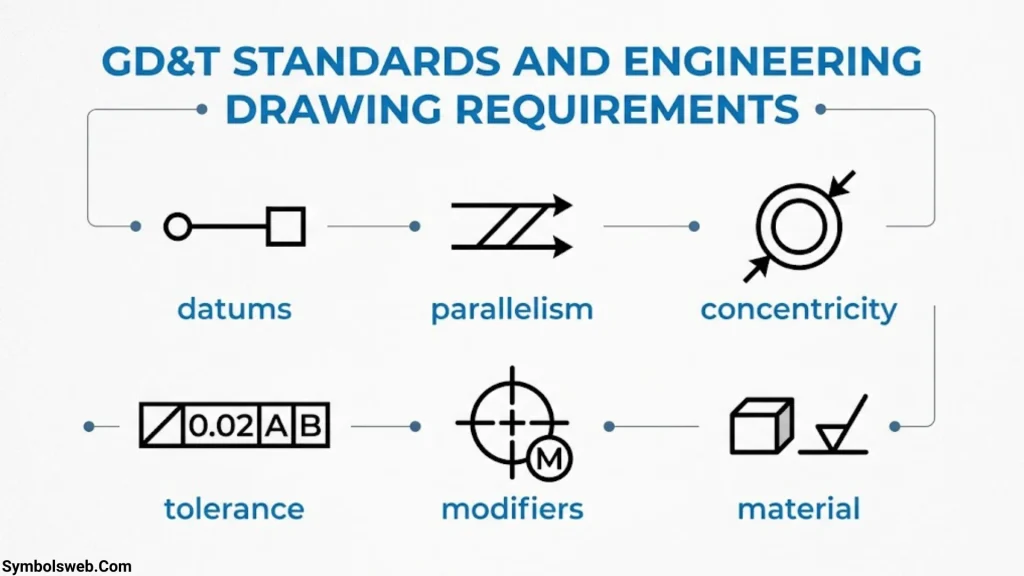
What Is the ASME Y14.5 Standard?
ASME Y14.5 is a dimensioning and tolerancing standard published by the American Society of Mechanical Engineers. It establishes rules, definitions, symbols, and recommended practices for communicating and interpreting geometric dimensioning and tolerancing requirements.
The standard helps engineers and manufacturers use a consistent language across technical drawings and related engineering documents.
ASME lists Y14.5-2018 Dimensioning and Tolerancing among its standards. The drawing or contract should identify the applicable edition.
ASME Y14.5 and ISO GPS
ASME Y14.5 and the ISO Geometrical Product Specifications (GPS) system both address geometric tolerancing, but they are not interchangeable in every detail.
Some symbols look alike while their definitions, rules, or applications may differ. For that reason, manufacturers should not assume that a callout has precisely the same meaning under both systems.
Always follow the standard specified by the engineering drawing, purchase specification, or contract.
Why the Drawing’s Stated Standard Matters
Engineering drawings can remain in use for years. A legacy drawing may include older symbols or practices that no longer appear in the current edition.
Before interpreting a callout:
- Check the stated standard and edition.
- Review drawing notes and general tolerances.
- Identify any legacy geometric controls.
- Confirm unclear requirements with the design authority.
- Ensure the inspection procedure follows the specified interpretation rules.
These steps help prevent misunderstandings between design, production, and quality teams.
Frequently Asked Questions About GD&T Symbols
What Does GD&T Stand For?
GD&T stands for Geometric Dimensioning and Tolerancing. It is a standardized system for specifying acceptable geometric variation in manufactured components using symbols, tolerance zones, dimensions, and datum references.
How Many GD&T Symbols Are There?
The answer depends on the standard and edition being discussed. The traditional teaching set contains 14 geometric characteristic symbols. ASME Y14.5-2018 removed concentricity and symmetry, leaving 12 current geometric characteristic symbols in that edition. Other drawing symbols and modifiers are separate from this count.
What Are the Five Categories of GD&T Tolerances?
The five commonly taught categories are form, profile, orientation, location, and runout. Each category controls a different aspect of geometry, from surface shape to feature location and rotational variation.
What Is the Most Commonly Used GD&T Symbol?
Position is one of the most widely used GD&T controls, especially for hole patterns, pins, and other features that must align during assembly. Its usefulness comes from defining acceptable feature location relative to specified references.
What Is a Datum in GD&T?
A datum is a theoretically exact reference established from a physical datum feature. Engineers use datums to define how a part should be oriented or located when applying geometric controls and inspecting the finished component.
What Does the Diameter Symbol Mean in a Feature Control Frame?
The diameter symbol (⌀) before a tolerance value can indicate a cylindrical tolerance zone. For example, a position tolerance of ⌀0.20 mm specifies a cylindrical zone 0.20 mm in diameter when the callout defines that zone.
It does not mean the controlled hole must have a diameter of 0.20 mm.
What Is Maximum Material Condition in GD&T?
Maximum Material Condition (MMC) is the size condition in which a feature contains the greatest amount of material within its permitted size limits. For a hole, this is the smallest permitted diameter. For a shaft, it is the largest permitted diameter.
When a suitable geometric tolerance uses MMC, a feature may receive bonus tolerance as its size departs from that condition.
How Do You Measure GD&T Tolerances?
Suitable methods include coordinate measuring machines, dial indicators, precision gauges, optical systems, and other metrology equipment. The correct method depends on the geometric control, feature accessibility, tolerance size, and measurement uncertainty.
The inspection procedure must follow the drawing’s datum references and applicable evaluation rules.
What Is the Difference Between Form and Position Tolerance?
Form tolerance controls the shape of an individual feature, such as its straightness, flatness, circularity, or cylindricity. Position tolerance controls the location of an applicable feature relative to its theoretically exact position and specified references.
A part can satisfy its form tolerance but fail its position tolerance.
Can You Use GD&T Without Datum References?
Yes. Form controls such as straightness, flatness, circularity, and cylindricity generally do not require datums. Profile controls may or may not require datum references, depending on the intended requirement.
Orientation, location, and runout controls generally rely on datum references under ASME Y14.5.
Conclusion
GD&T symbols provide a standardized way to define acceptable variation in manufactured parts. By understanding form, profile, orientation, location, and runout controls, you can interpret engineering drawings more accurately and recognize which geometric requirements matter to a component’s function.
The key is to read each symbol alongside its tolerance value, datum references, applicable modifiers, and associated dimensions. A symbol alone rarely tells the whole story.
Use the GD&T symbols chart as a quick reference, follow the standard specified on the drawing, and choose inspection methods that match the actual requirement. These habits support clearer engineering communication, reliable manufacturing, and consistent quality control.

Hi, I’m Ethan Holloway, and I’ve always believed that a few meaningful words can change the way we think, feel, and live. I enjoy collecting timeless quotes, studying their deeper meanings, and sharing inspiring messages that help people stay motivated through every stage of life.
Over the years, I’ve explored thousands of famous sayings from writers, leaders, philosophers, and everyday people. My goal is to make wisdom easy to understand and useful for everyone.
Books by Ethan Holloway
- The Power of Everyday Quotes
- Words That Inspire Greatness
 Jordan Hayes
 Eliana Foster