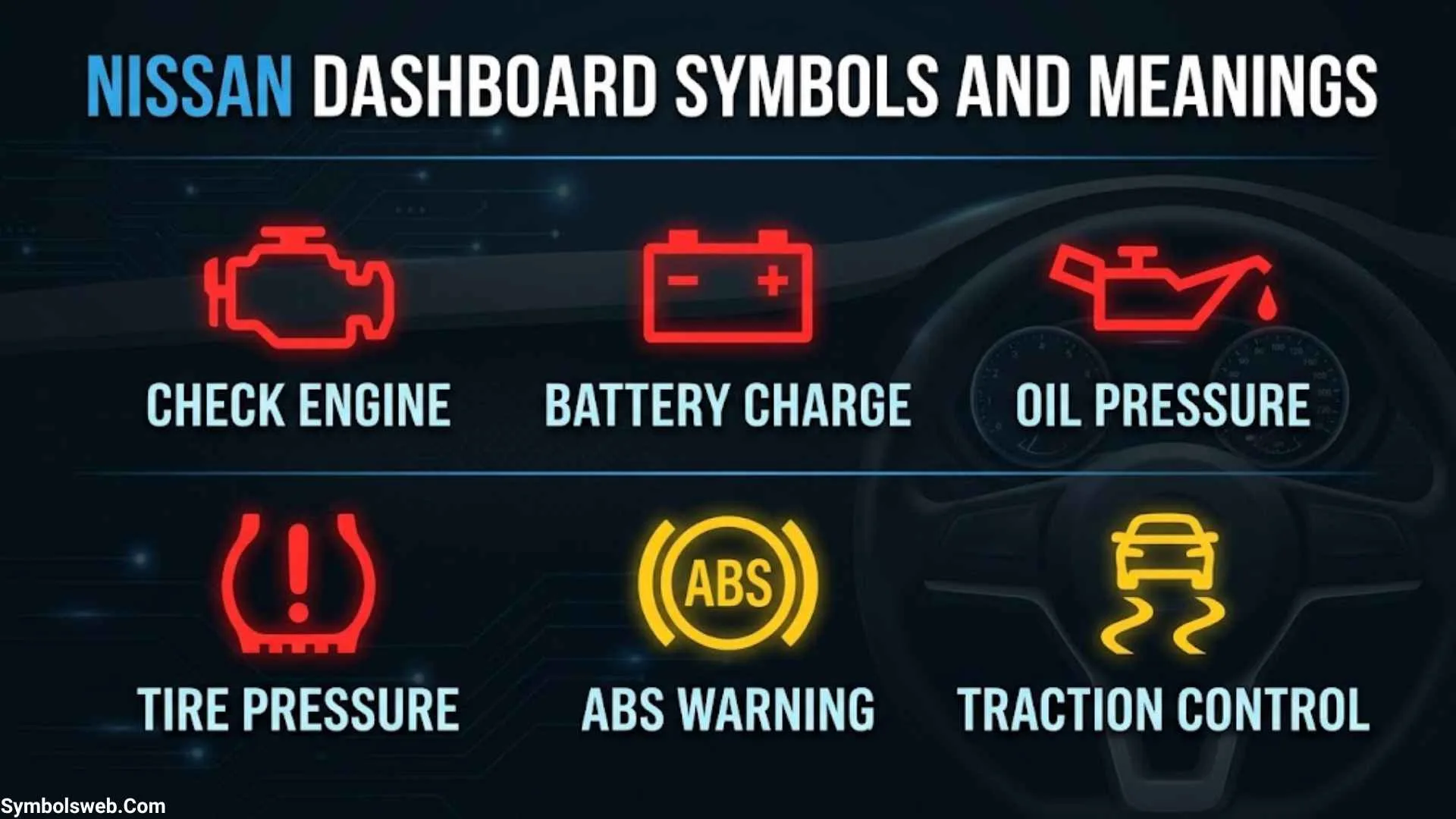
Your Nissan’s dashboard does more than display your speed and fuel level. It also alerts you to mechanical problems, safety system faults, maintenance needs, and features currently in use. Understanding Nissan dashboard symbols and meanings helps you recognize which lights need immediate attention and which simply tell you that a feature is active.
Some dashboard lights are easy to understand. A blue headlight symbol, for example, usually indicates that your high beams are on. However, a red oil pressure warning or a brake system warning can signal a serious problem that requires you to stop driving safely. Ignoring the wrong light could lead to expensive repairs or put you and your passengers at risk.
This guide explains common Nissan dashboard lights, their meanings, possible causes, and the steps you should take when they appear. You’ll also learn how warning light colors work, how to distinguish maintenance reminders from mechanical faults, and how to identify symbols specific to your Nissan model.
Nissan Dashboard Symbols and Meanings Chart
Use this Nissan dashboard symbols chart to identify common warning lights and indicators quickly. The descriptions below explain their typical meanings, but your vehicle’s manual takes priority when its instructions differ.
| Dashboard symbol or icon | Typical color | Meaning | What you should do |
| Oil can | Red | Low engine oil pressure | Pull over safely and shut off the engine. |
| BRAKE or circle with an exclamation mark | Red | Parking brake engaged, low brake fluid, or brake system problem | Release the parking brake. If the warning remains, stop safely and assess the braking system. |
| Battery | Red | Charging system malfunction | Stop somewhere safe and arrange assistance if necessary. |
| Thermometer over waves | Red or model-specific | Engine coolant temperature warning | Stop safely if the engine is overheating and follow the manual. |
| Engine outline | Amber | Check engine or emissions-related fault | Check the fuel cap if applicable and arrange diagnosis. |
| ABS inside a circle | Amber | Anti-lock braking system fault | Drive cautiously only if braking remains safe and seek prompt inspection. |
| Tire cross-section with an exclamation mark | Amber | Low tire pressure or TPMS malfunction | Check all tire pressures and inspect for damage. |
| Person with a circle in front | Red or model-specific | Airbag or supplemental restraint system warning | Arrange prompt professional inspection. |
| Seat belt figure | Red | Seat belt is not fastened or a related condition is detected | Fasten the seat belt and check the passenger seating conditions. |
| Triangle with an exclamation mark | Red or amber | Master warning or another vehicle alert | Read the vehicle information display. |
| Steering wheel with an exclamation mark | Red or amber | Electric power steering system warning | Use caution if steering effort increases and arrange inspection. |
| Car with wavy lines | Amber | Traction or stability control activity or fault | Check whether the light flashes during wheel slip or stays illuminated. |
| VDC OFF | Amber | Vehicle Dynamic Control is switched off | Check the setting and restore the system when appropriate. |
| AEB OFF or similar symbol | Amber or model-specific | Automatic emergency braking is unavailable or switched off | Check the displayed message and system conditions. |
| Fuel pump | Amber | Low fuel level | Refuel soon. |
| Turn signal arrows | Green | Turn signals or hazard indicators are operating | Check that the signals work as intended. |
| Headlamp with straight beams | Blue | High-beam headlights are on | Switch to low beams when appropriate for traffic conditions. |
| Exterior light symbol | Green | Exterior lights are selected | Confirm that the appropriate lights are on. |
| HOLD or brake hold symbol | White or green | Automatic Brake Hold status, where equipped | Check whether the feature is ready or actively holding the vehicle. |
The official Nissan dashboard warning light guide explains common indicators, including the oil pressure, ABS, TPMS, and malfunction indicator lights. The exact icon and operating behavior may differ between vehicles.
What Do Nissan Dashboard Light Colors Mean?
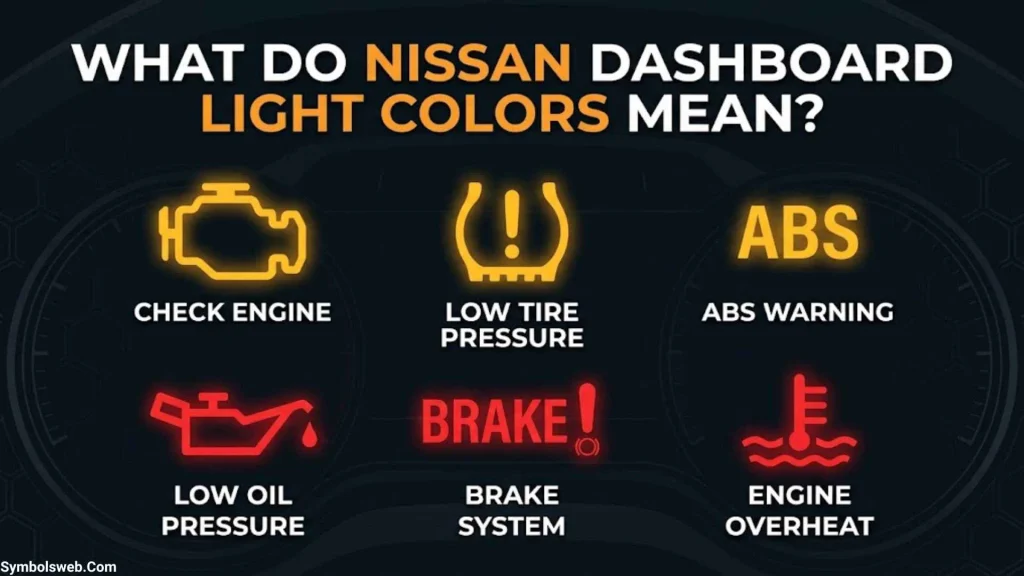
The color of a dashboard light provides a useful first clue about its urgency. However, color alone doesn’t tell the whole story. A warning’s meaning also depends on its symbol, whether it flashes, and any message displayed on the instrument panel.
Red Nissan Dashboard Warning Lights
Red Nissan warning lights often indicate a serious condition that needs immediate attention. Depending on the symbol, you may need to stop driving as soon as traffic conditions allow.
Common examples include:
- Engine oil pressure warning
- Brake system warning
- Charging system warning
- Engine overheating warning
- Certain airbag and restraint system warnings
For example, if the red oil pressure light appears while you’re driving, pull over safely and switch off the engine. Continuing to run an engine with inadequate oil pressure can cause severe damage.
A red light doesn’t always mean the same thing across every Nissan model. Read the accompanying message and consult the owner’s manual before deciding what to do.
Yellow or Amber Nissan Dashboard Lights
Yellow and amber dashboard lights commonly indicate a fault, a condition that needs attention, or a feature that has become unavailable. Some allow you to continue driving cautiously, while others require you to stop because of the symptoms involved.
Common examples include:
- Check engine light
- Low tire pressure warning
- ABS warning
- Electric power steering warning
- Vehicle Dynamic Control (VDC) indicators
- Driver-assistance system alerts
A steady amber check engine light may allow you to reach a repair facility if the vehicle runs normally. A flashing check engine light, particularly with shaking or rough running, can indicate a damaging engine misfire and requires a more urgent response.
Green Nissan Dashboard Indicator Lights
Green Nissan indicator lights generally confirm that a feature is active or operating.
Examples include:
- Turn signals
- Exterior lighting
- Certain driving assistance indicators
- Selected vehicle functions
Green doesn’t mean you can ignore every message associated with the indicator. It simply commonly identifies a system’s operating status rather than a fault.
Blue Nissan Dashboard Indicator Lights
The most familiar blue dashboard light is the high-beam indicator. It illuminates when your high-beam headlights are selected.
High beams improve visibility on dark roads, but you should switch to low beams when approaching other vehicles or following traffic closely.
White Nissan Dashboard Indicator Lights
White indicators can show that a feature is available, selected, or in standby mode. Some Nissan vehicles use white and green versions of the Automatic Brake Hold indicator to communicate different operating states.
Don’t assume every white symbol is harmless. Check the owner’s manual to understand what the specific icon means on your vehicle.
Red Nissan Dashboard Warning Lights and Their Meanings
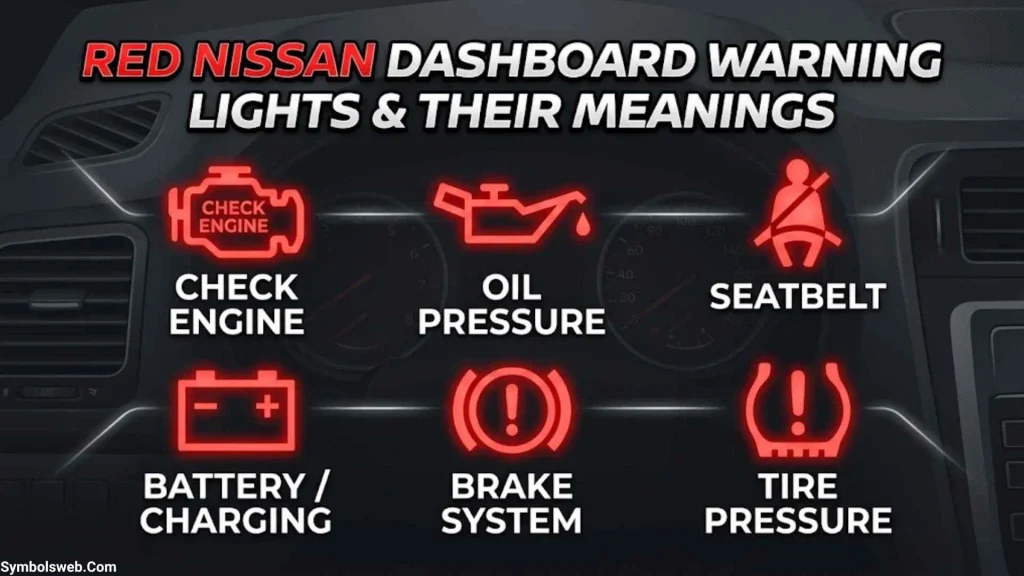
Red warning lights deserve special attention because some indicate conditions that can quickly damage your vehicle or affect safe driving. When a red light appears, check its symbol and follow the instructions in your Nissan owner’s manual.
Engine Oil Pressure Warning Light
Symbol: Red oil can
The Nissan engine oil pressure warning light indicates that the engine may not be receiving adequate oil pressure. Oil lubricates moving engine parts and helps control friction and heat. Without sufficient pressure, those parts can suffer severe damage.
Possible causes include:
- Low engine oil level
- An oil leak
- A failing oil pump
- A blocked oil passage
- A faulty pressure sensor or related electrical problem
What to do: Pull over somewhere safe and turn off the engine immediately. Check the oil level only when it’s safe to do so. If the level is normal, don’t assume the problem has disappeared. The warning concerns oil pressure, not simply the amount of oil in the engine.
Nissan specifically warns that running the engine with this light illuminated can cause serious damage. See the official Nissan dashboard warning light guide.
Brake System Warning Light
Symbol: BRAKE or a circle with an exclamation mark
The Nissan brake warning light may illuminate when the parking brake is engaged. It can also indicate low brake fluid or a brake system malfunction.
Start by confirming that the parking brake is fully released. If the warning stays on while you’re driving, pull over safely and check the owner’s manual.
Watch for additional symptoms, such as:
- A soft or unusually hard brake pedal
- Longer stopping distances
- Brake fluid leaking beneath the vehicle
- Reduced braking performance
If the brake pedal doesn’t work normally or brake fluid is critically low, don’t continue driving. Arrange towing or roadside assistance. A brake warning isn’t something to ignore simply because the vehicle still moves.
Battery or Charging System Warning Light
Symbol: Red battery
The Nissan battery warning light generally signals a charging system problem. Although the symbol looks like a battery, the fault may involve the alternator, wiring, connections, or drive belt.
Possible symptoms include dim headlights, electrical accessories behaving unusually, or difficulty keeping the engine running.
If the light appears while driving, stop at a safe location as soon as practical and arrange assistance. A charging fault may leave the vehicle unable to restart or cause electrical systems to stop functioning.
Avoid repeatedly restarting the engine to see whether the light disappears.
Engine Coolant Temperature Warning Light
Symbol: Thermometer over wavy lines, where equipped
This warning indicates that engine coolant temperature may be too high. Overheating can damage engine components, seals, and cylinder heads.
Possible causes include low coolant, a coolant leak, a cooling fan problem, or a malfunctioning thermostat.
If the temperature warning appears:
- Find a safe place to stop.
- Follow the vehicle’s overheating instructions.
- Switch off the engine if the manual directs you to do so or the engine is overheating.
- Let the engine cool completely before checking coolant.
- Arrange professional assistance if the warning persists or a leak is present.
Never open a hot radiator cap or coolant reservoir. Pressurized coolant can cause serious burns.
Supplemental Airbag Warning Light
Symbol: Seated person with a circle in front
The Nissan airbag warning light can indicate a problem with the supplemental restraint system, including airbags or seat belt pretensioners.
In many Nissan vehicles, the light illuminates briefly when you switch on the ignition and then turns off. If it remains on, flashes abnormally, or fails to illuminate during the normal system check, the restraint system may need inspection.
Arrange prompt professional diagnosis. Don’t attempt to repair airbag wiring or restraint components yourself because accidental deployment can cause serious injuries.
Seat Belt Warning Light
The seat belt warning light reminds occupants to fasten their seat belts. Depending on the vehicle, it may also respond to passenger occupancy or other detected conditions.
Fasten all seat belts and check the seating area if the warning continues. Never assume a warning is harmless merely because nobody appears to be sitting in the passenger seat.
Electric Shift Control and Electronic Parking Brake Warnings
Some Nissan models display a dedicated electric shift control system warning light or an electronic parking brake warning light.
These symbols don’t appear on every Nissan.
An electric shift control warning may indicate a fault affecting the vehicle’s electronic gear-selection system. An electronic parking brake warning may indicate that the brake hasn’t released properly or that the system needs attention.
If you can’t select a gear, the parking brake won’t release, or the vehicle cannot be secured safely, stop and seek assistance. Follow the exact message on your vehicle’s information display.
Master Warning Light
The Nissan master warning light often appears as a triangle with an exclamation mark or another model-specific warning symbol.
It acts as a general alert rather than identifying one specific failed component. The accompanying message may explain the actual issue.
Use the steering wheel controls or instrument-panel buttons to open the vehicle information display and read the warning. If the message isn’t visible, consult the owner’s manual for the correct menu or troubleshooting procedure.
Yellow and Amber Nissan Dashboard Warning Lights and Their Meanings
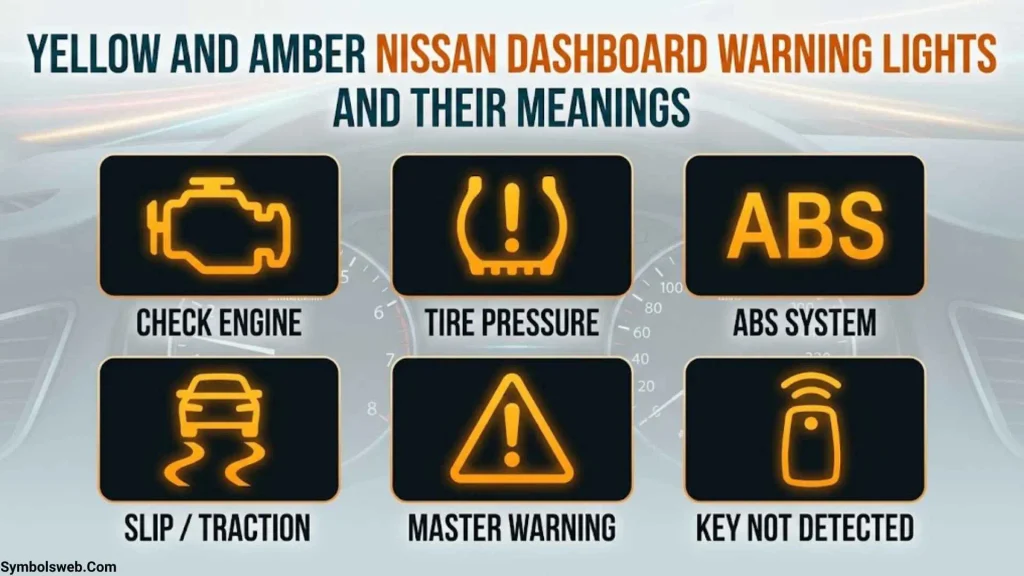
Yellow and amber Nissan dashboard warning symbols often indicate a detected fault or a feature that requires attention. The right response depends on the system involved and how the vehicle behaves.
Check Engine Light or Malfunction Indicator Light (MIL)
Symbol: Amber engine outline
The Nissan check engine light indicates that the engine management or emissions control system has detected a problem. The cause may be minor or serious.
Possible causes include:
- A loose or missing fuel filler cap, on applicable vehicles
- An ignition misfire
- A faulty sensor
- An emissions control problem
- A fuel delivery issue
A steady light with normal engine performance usually calls for timely diagnosis. Check the fuel cap if your model uses one, but don’t assume it explains every warning.
A flashing check engine light is more urgent. Nissan explains that a blinking malfunction indicator can indicate an engine misfire that may damage the emissions control system.
If the engine shakes, loses power, or runs roughly, stop safely and arrange assistance rather than continuing the trip.
Tire Pressure Warning Light (TPMS)
Symbol: Tire cross-section with an exclamation mark
The Nissan tire pressure warning light indicates that one or more tires may be underinflated. It can also signal a problem with the Tire Pressure Monitoring System (TPMS).
Cold weather can reduce tire pressure, while punctures, leaking valves, and damaged tires can cause pressure loss.
To investigate the warning:
- Park in a safe place.
- Inspect the tires for visible damage.
- Check pressure with a reliable gauge when the tires are cold.
- Inflate them to the pressure specified on the driver’s door-jamb label.
- Recheck the warning after following your model’s instructions.
Don’t use the maximum pressure printed on the tire sidewall as a substitute for Nissan’s recommended vehicle pressure.
Some Nissan models flash the TPMS light for about a minute before it remains illuminated when the system detects a malfunction. Check the owner’s manual for your specific vehicle’s behavior.
The 2025 Nissan Rogue owner’s manual explains that its TPMS monitors tire pressure and may display a low-pressure message. It also warns that the system may not detect a sudden pressure drop immediately.
Anti-Lock Braking System (ABS) Warning Light
Symbol: ABS inside a circle
The Nissan ABS warning light indicates a potential fault in the anti-lock braking system.
ABS helps prevent the wheels from locking during hard braking, helping the driver maintain steering control. If the warning remains illuminated after the normal startup check, the anti-lock function may be unavailable.
The regular brakes may still work, but you may not have ABS assistance during emergency braking. If the red brake warning light appears at the same time, treat the situation more seriously.
Drive only if the brakes work normally and the vehicle remains safe to control. Arrange prompt inspection.
Electric Power Steering Warning Light
This warning indicates that the electric power steering system may not be functioning properly.
You might notice that turning the steering wheel requires more effort than usual. The problem may involve the steering assistance system, its electrical supply, or associated components.
If steering becomes difficult or unpredictable, stop somewhere safe and arrange assistance. Don’t continue a long journey simply because you can still turn the wheel.
Vehicle Dynamic Control (VDC) and Slip Indicator
The Nissan slip indicator light is associated with traction control and Vehicle Dynamic Control (VDC).
When the system detects wheel slip, the indicator may flash as the vehicle attempts to maintain traction. This can happen on wet roads, loose gravel, snow, or other slippery surfaces.
A light that remains illuminated may indicate that VDC or a related system has been switched off or developed a fault.
Check the vehicle information display and avoid aggressive acceleration. If the warning persists under normal driving conditions, arrange an inspection.
VDC OFF Indicator
The VDC OFF light commonly appears when the driver has disabled Vehicle Dynamic Control.
This isn’t necessarily a malfunction. Some drivers temporarily switch the system off when trying to free a vehicle stuck in mud or snow.
For normal driving, Nissan generally recommends keeping VDC enabled. Check your owner’s manual for the correct procedure to reactivate it.
Automatic Emergency Braking (AEB) and Rear Automatic Braking (RAB) OFF Lights
These indicators appear on Nissan models equipped with the corresponding driver-assistance features.
- AEB OFF: The automatic emergency braking feature may be switched off or unavailable.
- RAB OFF: The rear automatic braking feature may be switched off or unavailable.
Possible reasons include driver-selected settings, obstructed sensors, or system faults, depending on the model.
Check the dashboard message and inspect accessible sensor areas for dirt, snow, or other obstructions when safe. Clean only according to the owner’s manual.
Remember that these systems are driving aids, not substitutes for attentive driving. If a feature is unavailable, leave additional space and take extra care when maneuvering.
Front Passenger Airbag Status Indicator
This indicator communicates the passenger airbag’s operating status on equipped vehicles.
It is different from the airbag system malfunction warning. A passenger airbag may be intentionally deactivated under certain seating or occupant conditions.
Follow the vehicle’s passenger safety instructions, especially when installing a child restraint. If the indicator contradicts the expected status or the manual describes it as abnormal, have the system checked.
Green, Blue, and White Nissan Dashboard Indicator Lights
Not every Nissan dashboard icon indicates a fault. Many simply tell you which lights or features are active.
| Indicator | Typical meaning |
| Green turn signal arrows | Turn signal is operating |
| Green exterior light symbol | Selected exterior lights are on |
| Blue headlamp symbol | High beams are active |
| High Beam Assist indicator | Automatic high-beam feature is operating, where equipped |
| White Automatic Brake Hold indicator | Brake hold system is in a standby or ready state on certain models |
| Green Automatic Brake Hold indicator | Brake hold function is active on certain models |
| Cruise control indicator | Cruise control or a related driving feature is selected or active |
Turn Signal and Hazard Warning Indicators
Green arrows normally flash when the turn signals are operating. The hazard warning indicators flash when the hazard lights are activated.
If a turn signal suddenly flashes faster than usual, check the exterior bulbs and lighting system. The cause depends on the vehicle and may require inspection.
High Beam and Exterior Light Indicators
The blue high-beam symbol tells you that high beams are on. The exterior light indicator generally confirms that the applicable lighting setting has been selected.
These indicators are useful reminders, especially when driving on dark roads. Check your lights before setting off and use high beams responsibly.
Automatic Brake Hold Indicator
On equipped models, Automatic Brake Hold can keep the vehicle stationary after you bring it to a stop, under the conditions specified by Nissan.
Different colors may distinguish standby from active operation. Check the exact indicator behavior in your manual and don’t assume the vehicle is secured simply because the feature is available.
Nissan Dashboard Maintenance Lights and Service Reminder Symbols
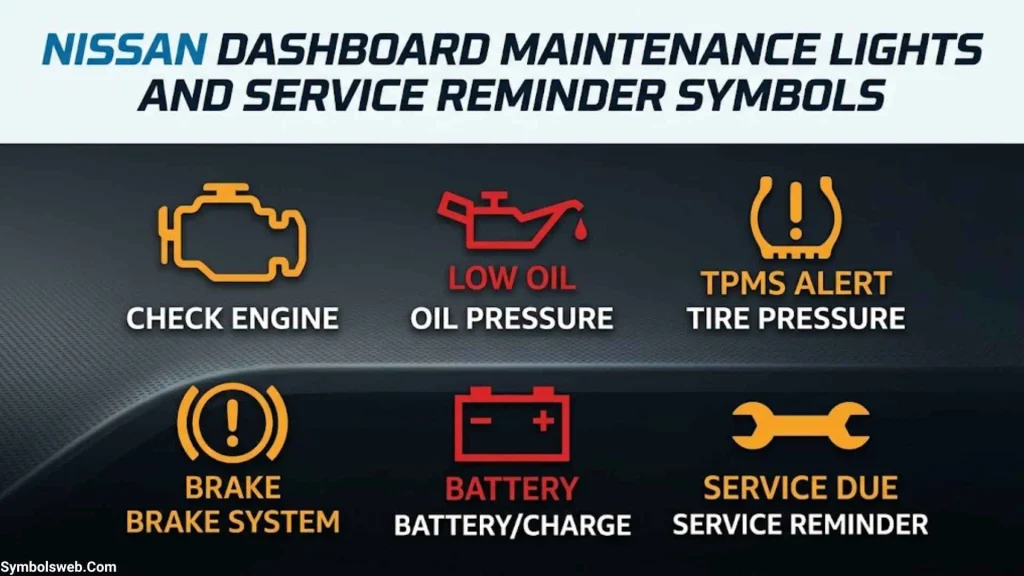
Maintenance reminders are different from warnings about immediate mechanical problems. They often indicate that scheduled service is due rather than that a component has failed.
Oil Change and Maintenance Reminder
A maintenance notification may remind you to change the engine oil, rotate the tires, or perform another scheduled service.
For example, Nissan’s maintenance schedules provide vehicle-specific intervals. The 2025 Nissan Rogue oil and filter maintenance guide lists replacement every 7,500 miles or 12 months for that model under the displayed schedule.
That interval is not universal. Your model, engine, market, and driving conditions may require a different schedule.
Important distinction: An oil change reminder doesn’t mean the same thing as a red engine oil pressure warning. One concerns scheduled maintenance; the other can signal a condition that damages the engine.
Wrench Symbol and Service Messages
A wrench icon or service message may identify scheduled maintenance or a vehicle-specific notification.
The exact meaning varies. Read the full message and check the manual before resetting anything.
If the reminder appears after recent service, confirm that the maintenance procedure was completed and that the reminder was reset correctly.
Exclamation Mark Warning Symbol
An exclamation mark can appear in several different dashboard symbols. Its meaning depends on the surrounding shape, color, and displayed message.
For example, it may be associated with the brake system, tire pressure, or master warning function.
Don’t diagnose a problem from the exclamation mark alone. Identify the complete icon first.
How to Reset a Nissan Maintenance Reminder
The reset procedure differs across Nissan models and model years. Some vehicles use instrument-panel controls, while others provide settings through the vehicle information display.
In general:
- Confirm that the scheduled maintenance has been completed.
- Open the relevant maintenance or settings menu.
- Follow the instructions in the owner’s manual.
- Verify that the reminder has reset correctly.
Never reset a fault warning just to make it disappear. A check engine, oil pressure, brake, or airbag warning may require diagnosis and repair before it can safely be cleared.
What Should You Do When a Nissan Dashboard Warning Light Comes On?
When a warning appears, don’t panic. A clear sequence of checks can help you decide what to do without overlooking a serious problem.
Identify the Symbol and Read the Message
Start by noting the exact icon, its color, and whether it stays on or flashes. Look for a message on the instrument cluster or vehicle information display.
If you’re unsure what the icon means, check the official Nissan owner’s manual library. Select your model and year rather than relying on a generic symbol chart.
Decide Whether to Stop Driving
Stop safely and follow the manual’s instructions if you see a critical warning involving:
- Engine oil pressure
- Engine overheating
- Serious brake system problems
- Unsafe steering
- Smoke, burning smells, or severe engine symptoms
Don’t stop in a dangerous traffic lane unless doing so is necessary to avoid immediate danger. Move to a safe location whenever possible.
Perform Basic Checks Safely
Depending on the warning, you may be able to:
- Release the parking brake fully.
- Check tire pressure with a gauge.
- Inspect tires for obvious damage.
- Check the engine oil level after safely stopping the engine.
- Look for visible fluid leaks without touching hot components.
- Check whether a sensor area is obstructed.
Avoid working beside moving traffic or inspecting hot, pressurized, or energized components.
Arrange Professional Diagnosis
A mechanic may use a diagnostic scanner to retrieve diagnostic trouble codes from the vehicle’s control modules.
These codes help identify which system has detected a fault. However, a code doesn’t always prove that a particular sensor or component has failed. Further testing may be needed.
Tell the technician when the warning appeared, whether it flashed, and whether you noticed changes in performance. Those details can help narrow down the cause.
Common Nissan Dashboard Warning Light Problems
Why Does the Nissan Check Engine Light Stay On?
A steady check engine light can indicate an emissions control fault, sensor problem, ignition issue, or another engine management concern.
Check the fuel filler cap if your vehicle has one. If the light stays on, arrange diagnostic testing rather than replacing parts at random.
Why Does the Nissan Check Engine Light Flash?
A flashing malfunction indicator can signal an engine misfire that may damage the emissions control system.
If the engine shakes, runs roughly, or loses power, stop safely and seek assistance. Avoid hard acceleration or continuing a long trip to see whether the light disappears.
Why Won’t the Nissan Tire Pressure Light Turn Off?
The light may remain on because a tire is still underinflated, a tire has a leak, or the TPMS has a fault.
Measure all tire pressures when the tires are cold and inflate them to the recommended values. If the warning persists after correcting the pressure, follow the model-specific reset instructions or arrange an inspection.
Why Is the Nissan Battery Light On While Driving?
The charging system may not be maintaining the correct electrical supply. Possible causes include alternator, wiring, connection, or drive-belt problems.
Avoid unnecessary electrical loads and head to a safe stopping place. Don’t assume that replacing the battery will fix the problem; the charging system may need testing.
Why Is the Nissan Brake Warning Light Staying On?
The parking brake may still be engaged, brake fluid may be low, or a fault may exist in the brake system.
If the light stays on after releasing the parking brake, stop safely and investigate according to the manual. If braking feels abnormal or fluid is leaking, don’t continue driving.
Why Are Multiple Nissan Dashboard Warning Lights Appearing at Once?
Several warning lights can appear together when one underlying problem affects multiple systems. Electrical supply issues, sensor faults, or a control system problem can sometimes trigger several alerts.
Read all displayed messages and record which lights appear. A proper diagnostic scan can help identify the underlying cause.
Do Nissan Dashboard Symbols Vary by Model and Year?
Yes. Nissan dashboard symbols vary by model, year, trim, and installed equipment. A Nissan Rogue may have driver-assistance indicators that aren’t available on a particular Versa or Frontier. Even vehicles with the same model name can use different displays across generations.
| Nissan model | What to check in the model-specific manual |
| Nissan Altima | Engine, braking, tire pressure, and available driver-assistance warnings |
| Nissan Rogue | TPMS, powertrain, stability control, and equipped driver-assistance systems |
| Nissan Sentra | Engine, braking, tire pressure, and maintenance indicators |
| Nissan Kicks | Engine, safety systems, and available assistance features |
| Nissan Versa | Powertrain, braking, tire pressure, and maintenance reminders |
| Nissan Pathfinder | Engine, braking, stability control, and available assistance systems |
| Nissan Frontier | Engine, charging, braking, and four-wheel-drive indicators where equipped |
| Nissan Armada | Engine, safety systems, vehicle status, and available assistance features |
This table provides a starting point, not a definitive list of every symbol on each vehicle.
To identify a symbol accurately, find the model year and trim, then consult the corresponding manual. You can also ask a qualified technician to confirm the symbol and diagnose any underlying fault.
How to Identify a Nissan Dashboard Symbol You Don’t Recognize
If a symbol appears unfamiliar, use these steps to identify it accurately:
- Examine the shape: Look for an engine outline, oil can, battery, tire, steering wheel, or another recognizable feature.
- Check the color: Note whether it’s red, amber, green, blue, or white.
- Read the message: The vehicle information display may provide a more specific explanation.
- Check the manual: Match the symbol to the exact Nissan model year.
- Consider the timing: Note whether the light appeared during startup, while driving, after refueling, or following maintenance.
- Seek diagnosis when needed: If a warning persists or the vehicle behaves unusually, arrange a professional inspection.
Some dashboard lights illuminate briefly when you switch on the ignition. This startup check helps confirm that the indicators and related systems operate as expected. If a light behaves differently from the manual’s description, the system may need inspection.
When Should You Take Your Nissan to a Service Center?
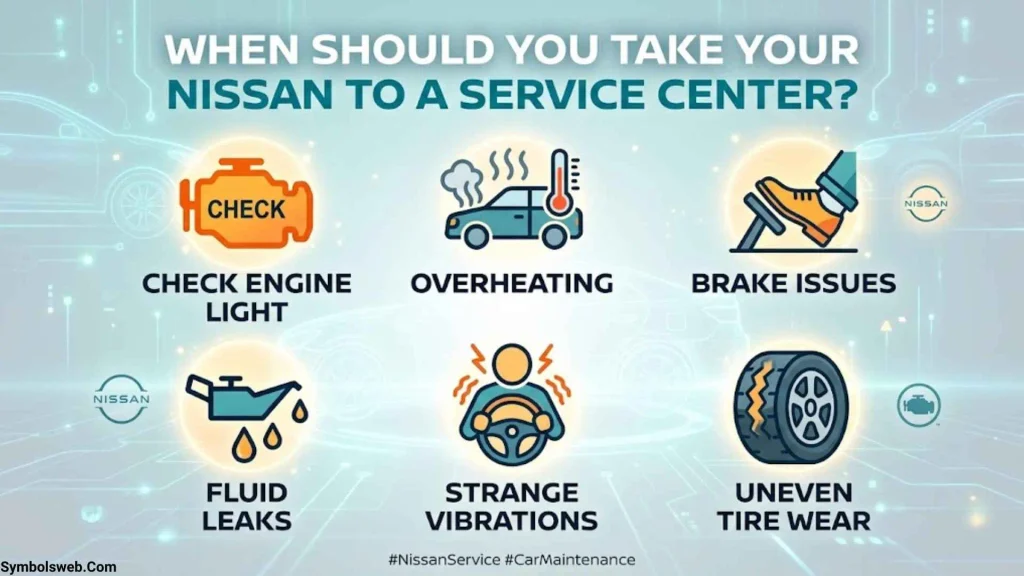
The right time for service depends on the warning and the vehicle’s behavior.
Warning Lights That Need Immediate Attention
Stop safely and follow the owner’s manual when you see a critical oil pressure or overheating warning. A serious brake warning, unsafe steering condition, or major loss of vehicle performance may also require towing.
Warning Lights That Need Prompt Inspection
Arrange diagnosis for a persistent check engine light, ABS warning, airbag system warning, steering assistance fault, or TPMS warning that remains after correcting tire pressure.
Even when the vehicle appears to drive normally, a warning may indicate that a safety feature is unavailable.
What to Tell the Technician
To make diagnosis easier, provide:
- The exact dashboard symbol and color
- Whether the light stays on or flashes
- The message displayed on the instrument cluster
- When the warning first appeared
- Any recent repairs, maintenance, or battery replacement
- Changes in engine performance, steering, braking, or handling
This information helps the technician reproduce the problem and determine which systems require testing.
Frequently Asked Questions About Nissan Dashboard Symbols and Meanings
What Do Nissan Dashboard Symbols Mean?
Nissan dashboard symbols communicate vehicle status, active features, maintenance reminders, and system faults. The meaning depends on the icon, its color, the model, and any accompanying message.
What Does a Red Nissan Dashboard Light Mean?
A red light often signals an urgent condition. Oil pressure, overheating, and serious brake warnings may require you to stop driving safely and follow the manual’s instructions.
What Does a Yellow Nissan Dashboard Light Mean?
A yellow or amber light commonly indicates a detected fault, a system limitation, or a condition requiring attention. Check the symbol and message to determine whether you can continue driving cautiously.
Can I Drive My Nissan With the Check Engine Light On?
A steady check engine light with normal vehicle behavior may allow you to drive cautiously to a repair facility. A flashing light, especially with rough running or loss of power, is more urgent and may require stopping safely and arranging assistance.
What Does the Nissan Tire Pressure Light Mean?
It usually indicates that one or more tires are underinflated. It may also indicate a TPMS malfunction. Check all tire pressures when cold and use the recommended values on the vehicle’s tire information label.
Why Is My Nissan Showing Multiple Warning Lights?
Multiple warnings can appear because of an underlying electrical, charging, sensor, or control system issue. Read the messages and arrange a diagnostic inspection instead of assuming every warning represents a separate failed component.
Do Nissan Dashboard Symbols Mean the Same Thing on Every Model?
No. Symbols, colors, and operating behavior can vary by model year, trim, powertrain, market, and installed features. Always consult the owner’s manual for your exact vehicle.
How Do I Reset Nissan Dashboard Warning Lights?
Maintenance reminders may be reset through the instrument cluster or vehicle settings after completing the required service. Fault warnings generally need diagnosis and repair first. Follow the model-specific manual rather than clearing a warning without understanding its cause.
Final Thoughts on Nissan Dashboard Symbols and Meanings
Understanding Nissan dashboard symbols and meanings helps you respond confidently when a warning appears. Red oil pressure, overheating, and serious brake warnings can require immediate action, while amber lights often call for troubleshooting or prompt inspection. Green, blue, and white indicators usually communicate the status of a feature.
The most important step is to identify the exact symbol, read any accompanying message, and consult the correct owner’s manual. Never ignore a persistent warning or assume that a vehicle is safe simply because it still drives. When the cause isn’t clear, professional diagnosis can help protect your Nissan, your passengers, and your safety.

Hi, I’m Ethan Holloway, and I’ve always believed that a few meaningful words can change the way we think, feel, and live. I enjoy collecting timeless quotes, studying their deeper meanings, and sharing inspiring messages that help people stay motivated through every stage of life.
Over the years, I’ve explored thousands of famous sayings from writers, leaders, philosophers, and everyday people. My goal is to make wisdom easy to understand and useful for everyone.
Books by Ethan Holloway
- The Power of Everyday Quotes
- Words That Inspire Greatness
 Jordan Hayes
 Eliana Foster